Skills are FilmMovieStudio's ready-made creative pipelines: type a slash command in the chat, describe what you want, and the AI director walks the whole job — asking you the creative questions, generating the images, clips, audio, and documents onto your canvas, and (for video skills) rendering the final cut. This chapter is the complete reference for every bundled skill: what it makes, a realistic example prompt, and how a run actually unfolds.
There are two tiers. Workflow skills are multi-stage productions — they pause at creative gates so you approve the plan, the style, the keyframes. Quick skills are one-shot tools: one prompt in, one result out, no questions. You can run any skill three ways: type its /command in the chat, pick it from the Skills menu next to the chat input, or open it from the Hub page and click Run.
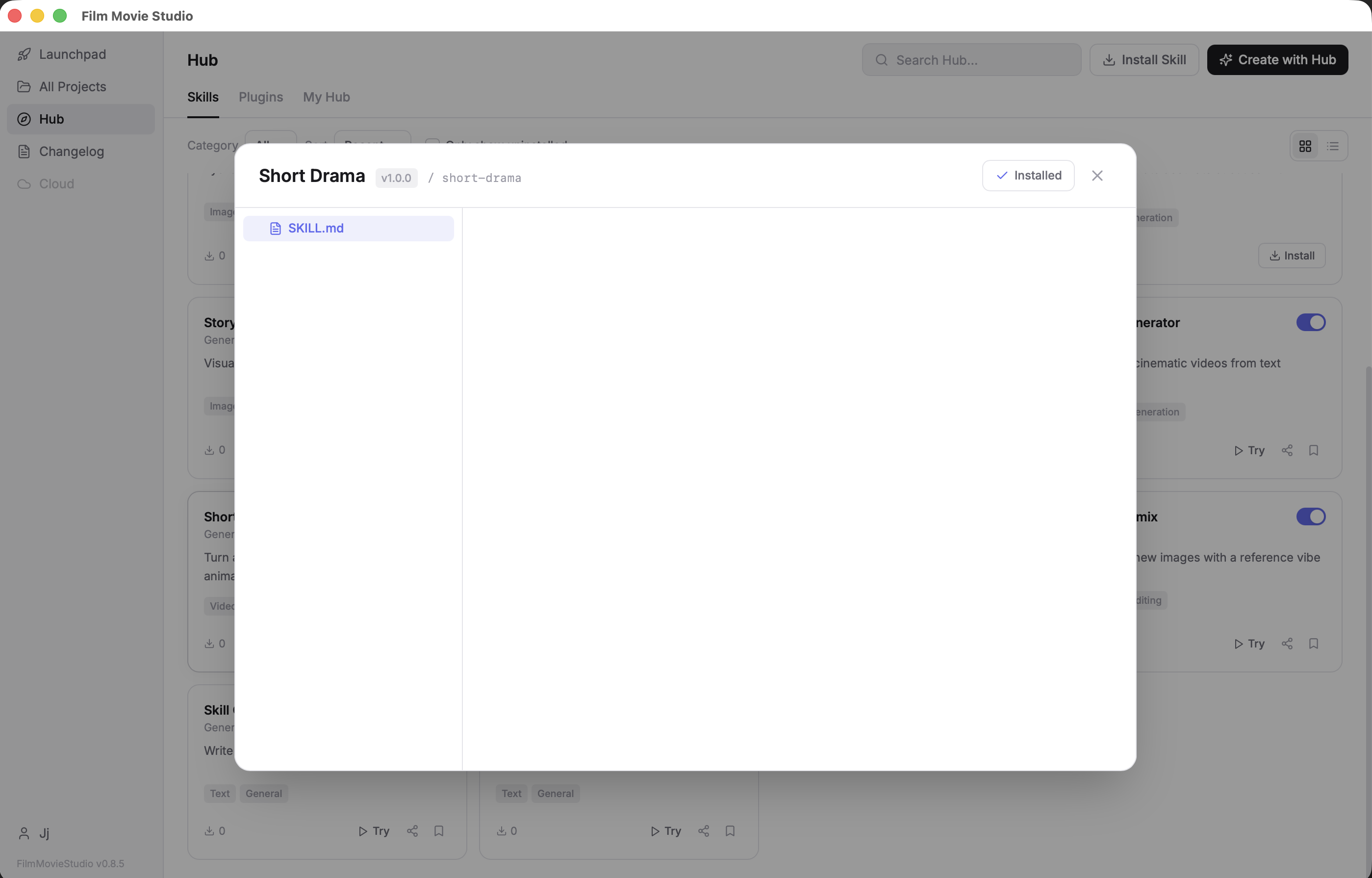
Tip: A workflow skill remembers where it was — even across restarts. Type
/continueto resume an interrupted run,/statusfor a local progress report,/redo <what>to regenerate just one part, or/start-overto clear the session.
Contents
- Short Drama & Storytelling — Short Drama · Animal Podcast · Continue Story · Zodiac World · Wasteland Short Film
- E-commerce & Product — Ecommerce Design · E-commerce Image · Detail Page Designer
- Advertising — Ad Idea · Promo Video · Surreal Spot · Dynamic Poster · HiLo Promo · YouTube Creator
- Music Video — MV Creator · Sword Dance · Beat Sync Editor
- Documentary & Explainer — Documentary
- Visual Production — Avatar & Figure Studio · Storyboard · Poster Design · Anime Design · Anime Style Forge · Film Assets · Film Shot · Character & Scene Sheet · Face Warp · Film Style Picker
- Audio & Voice — ASMR Ambient · Narrate Scene · Drama Soundtrack · Audiobook · Voice Clone
- Games & Interactive — Games · 3D Game Studio
- Platform Tools — App Builder · App Walkthrough · Documents · Automation · Skill Creator
- Quick Tools — Quick Image · Quick Video · Quick Audio · N-Grid Storyboard · Image Remix · Minecraft Pixel Art · Multi-Shot · Image Paint Edit · Relight · Video Prompting · Camera Path Prompter · Clip Export · Skill Reviewer · Voice Design
Short Drama & Storytelling
Short Drama
The flagship skill. /short-drama is a full AI filmmaking director: it takes a one-line story idea and walks it through script analysis, character design, a locked visual style, episode plans, scene keyframes, animated clips, audio, and a final rendered cut — pausing at every meaningful creative gate so you make the calls.
Example prompt: /short-drama A jaded Tokyo detective adopts a stray cat that can smell lies
How it runs:
Intent & characters. The director reads your idea (and any reference photos you attached), identifies genre, tone, and audience, and writes a short profile card for each main character.
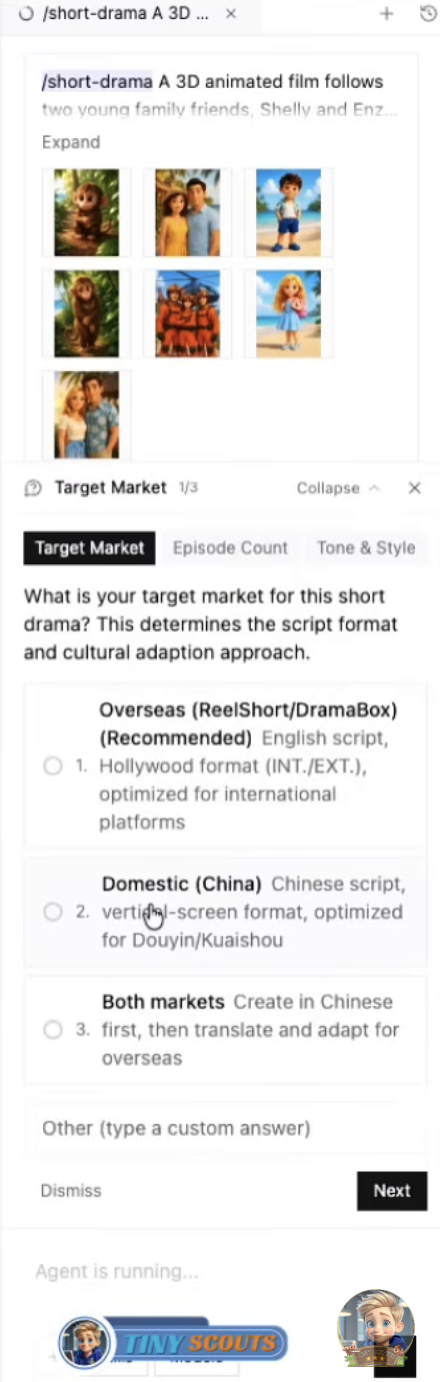
The creative brief. It pauses and asks you a tabbed brief shaped to your story: target market, episode count, and tone & style — each tab with concrete options to pick from.
Style lock & portraits. From your style pick it writes a binding "Style Bible", generates a style anchor image, then a reference portrait for every character — so the look and the faces stay identical across every future shot. It offers to save your leads to the Cast library so they keep the same face and voice in future projects.
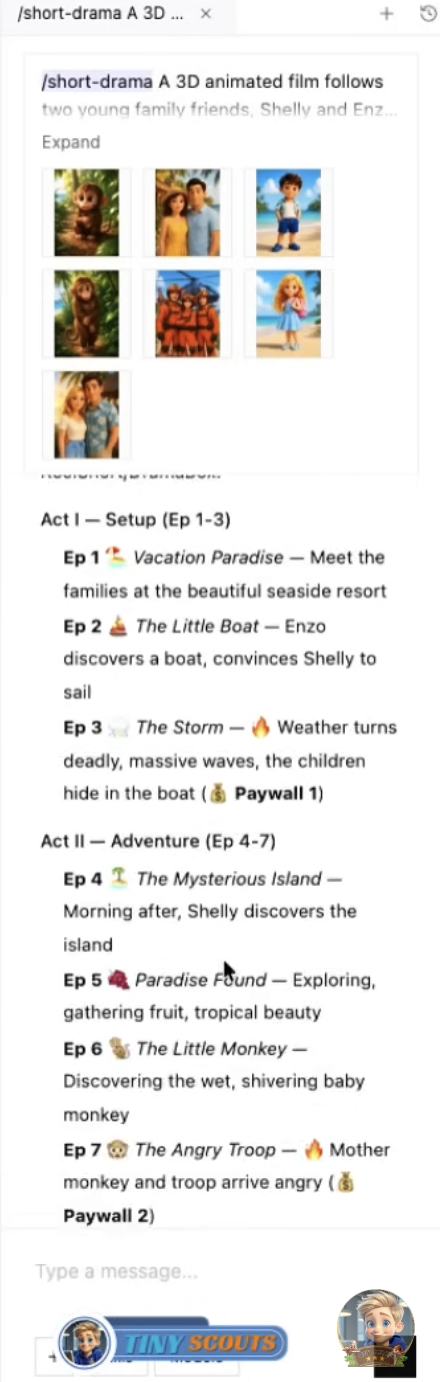
Creative plan & episodes. It drafts the act structure, one card per episode, and three scene beats per episode — then pauses for you to approve the plan or change the brief.
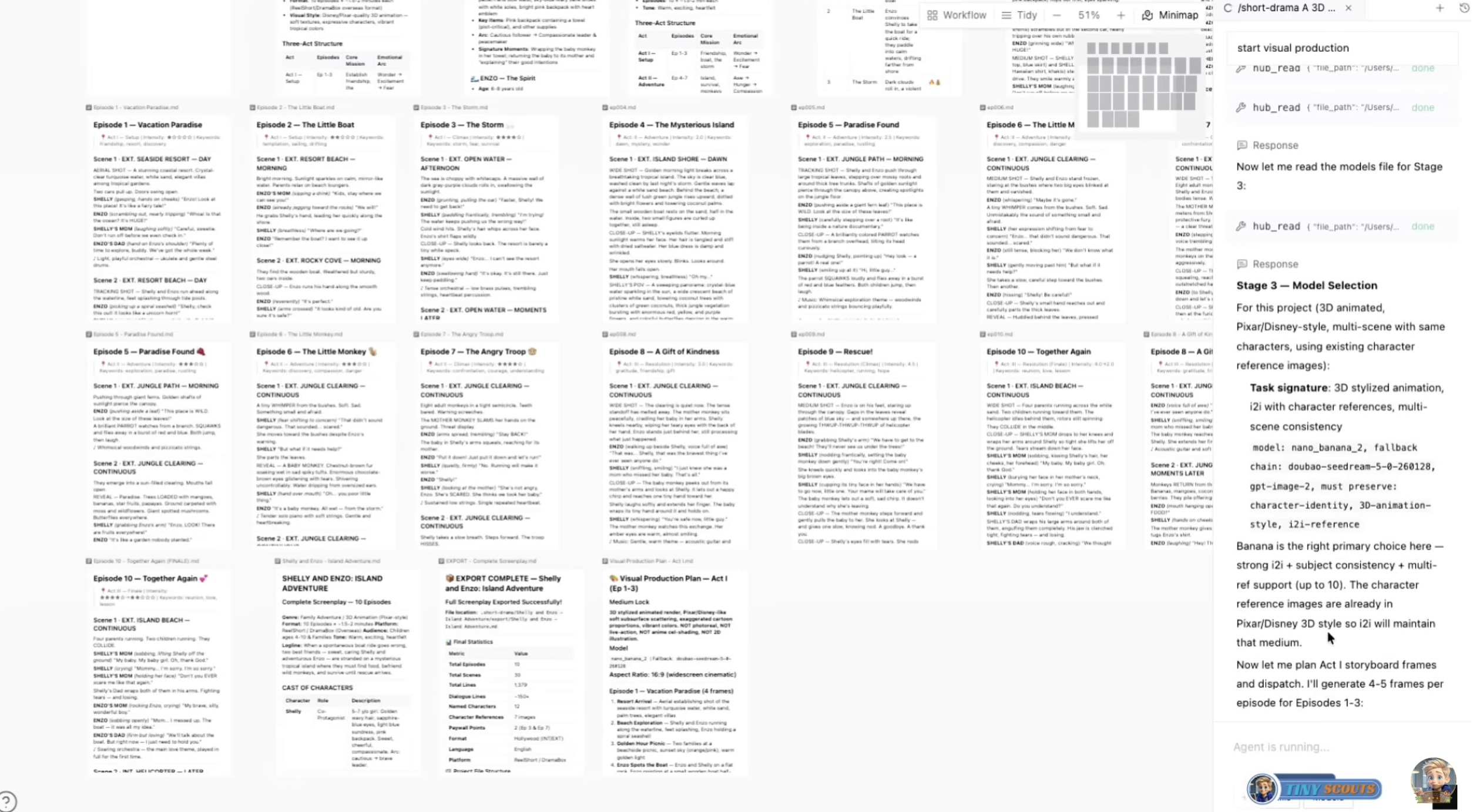
Keyframes & production brief. After approval it generates a keyframe image for every scene (character portraits attached as references), asks you to confirm them, then asks a second tabbed brief: how much to produce now, what kind of audio bed, and how long each clip should be.
Clips, audio, render. Each keyframe is animated into a video clip (dialogue scenes get lip-synced speech), music is scored to your audio pick, and after a final "Open timeline / Render now" gate the whole thing is composited into an MP4 with crossfades and dropped on the canvas as the Final Render.
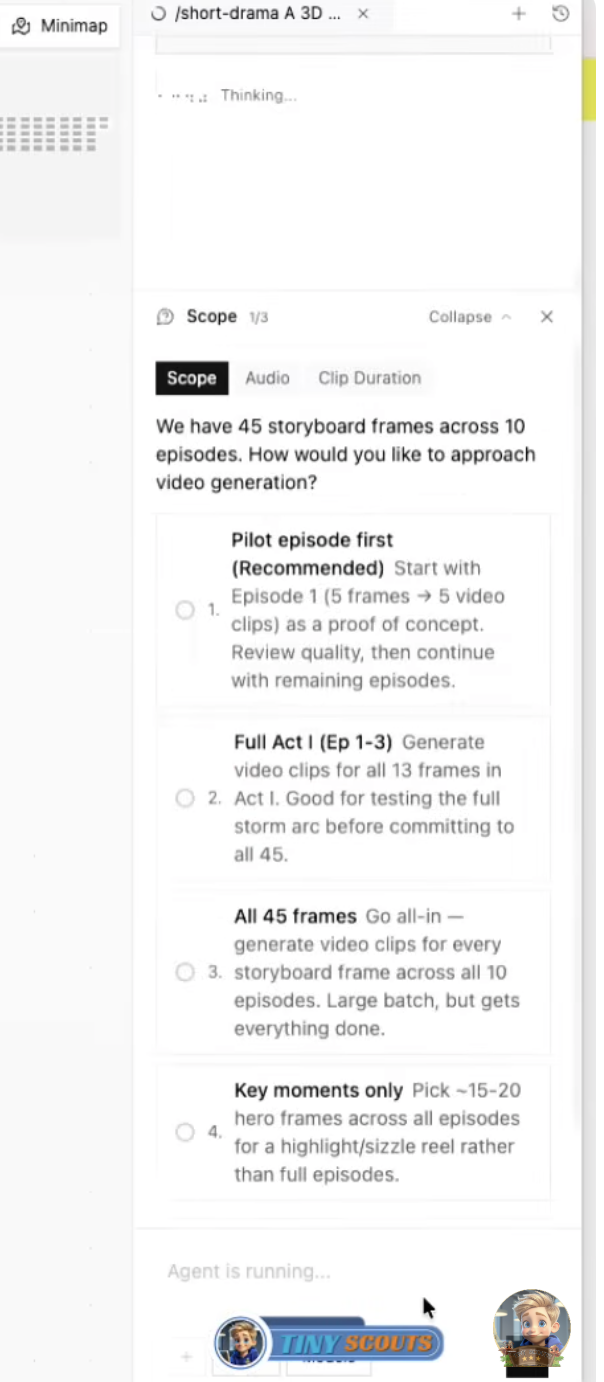
Tip: The more flavor in your opening line — genre, setting, a twist — the better the brief options it invents for you. You can attach photos with the first message and the director will design the characters from them.
Animal Podcast
/animal-podcast makes a comedic 30–39 second short where two contrasting animal hosts roast a human-world topic from an animal point of view — sized for TikTok, Shorts, and Reels, with burned-in subtitles and pop-text.
Example prompt: /animal-podcast Make a 9:16 podcast where a Shiba Inu and an orange cat discuss why humans pay for gym memberships. Tone: sarcastic but cute
How it runs:
- Designs two contrasting hosts (or offers you 3–4 fun pairings if you didn't pick animals) and asks for your aspect ratio (9:16 or 16:9).
- Writes the comedy script — scene beats and dialogue lines — and checks the format before continuing.
- Generates a style-locked portrait of each host to anchor the visuals.
- Produces per-line voiceover, two ~15-second animated clips, background music, and reaction sound effects (laugh, surprise, applause…).
- Assembles the timeline, burns in subtitles and pop-text, and renders the final vertical video.
Tip: The best topics are human habits animals would misunderstand — work meetings, dating apps, expensive coffee, productivity culture.
Continue Story
/continue-story picks up an existing project and generates the next scene — visually continuous with the last clip, reusing your locked style and character portraits. One scene per run, so you stay in control of the plot.
Example prompt: /continue-story The rivals are forced to share one umbrella when the storm finally breaks
How it runs:
- Reads your canvas — finds the latest clip, the character portraits, and the story so far.
- Extracts the last frame of the previous clip as a continuity anchor.
- Writes the next scene beat (or proposes one and asks you to confirm if you gave no direction).
- Generates a keyframe referencing the last frame and the character portraits, then animates it into the next clip.
- Asks whether you want another scene, to open the timeline, or to render.
Zodiac World
/zodiac-world produces a 30–60 second vertical children's English-learning episode (ages 3–8) set in the zodiac forest village of Kazefumori — a warm-3D story plus a sing-along closing song, with one core English phrase repeated so it sticks.
Example prompt: /zodiac-world Rabbit learns to say "May I borrow this?" after taking Monkey's kite without asking
How it runs:
- Asks a short brief: which zodiac friend to feature (Rabbit / Tiger / Rat / Dragon), the age band (3–5 or 6–8), episode length (30/45/60s), and language.
- Writes the script and song lyrics and pauses for your approval.
- Generates character turnaround sheets, a scene sheet, and a scale sheet, then a keyframe for every story beat.
- Records the voiceover line by line plus the children's song, and times each clip to the measured audio.
- Adds subtitles, assembles the timeline, and renders the finished 9:16 episode.
Wasteland Short Film
/wasteland-short-film is a post-apocalyptic 3D-CG episode maker with a dark, game-cinematic look. Give it a premise and it delivers a style-locked wasteland short — batch keyframes, image-to-video clips, sparse voiceover, ambient score, and an optional unifying color grade.
Example prompt: /wasteland-short-film A lone scavenger finds a still-working music box in a dead city, 60 seconds, quiet desolation
How it runs:
- Takes your premise (attach character illustrations to continue a series) and asks a brief: length (30/60/90s), cast size (1–3), and mood (Tense / Quiet desolation / Hard action).
- Writes the creative plan and a Style Bible, and pauses for your approval.
- Designs the fixed cast, then batch-generates every first-frame image — with a second gate to confirm the frames before any video is made.
- Animates the frames into clips, optionally applies a unifying color grade.
- Adds sparse voiceover (0–4 lines max), subtitles, an ambient score, and renders the final 16:9 film.
E-commerce & Product
Ecommerce Design
/ecommerce-design is a professional e-commerce image designer covering 14 retail verticals — apparel to electronics to food. It crafts product-first, compliance-safe, platform-ready listing images one careful shot at a time, scoring each result and inspecting it for defects before delivering.
Example prompt: /ecommerce-design Hero image for a matte-black ceramic pour-over coffee set, Amazon main image plus one lifestyle scene
How it runs:
- Checks the required facts and asks only for what's missing: category, the product's exact color/material/finish, target platform, how many images and their roles, with or without a model.
- Builds an attribute card from your uploaded product reference and identifies the right category playbook.
- Chooses the shot types and locks cross-image consistency (palette, lighting, product identity).
- Generates each image from a precisely assembled prompt matched to platform specs.
- Scores every image on six weighted dimensions and inspects for defects, regenerating a failed shot once.
E-commerce Image
/ecommerce-image turns one real product photo into a complete, platform-compliant listing set — hero, white-background, lifestyle, detail macro, scale, and variant shots — with the original photo referenced on every generation so the product never drifts.
Example prompt: /ecommerce-image Turn this into a full Amazon listing set, editorial premium styling (attach your product photo)
How it runs:
- Takes your product photo and analyzes it — materials, proportions, brand cues.
- Asks a short brief: platform (Amazon / Shopify / TikTok Shop / Etsy / Instagram), scope (Hero only / Core 5 / Full 7), and styling direction (Minimal Clean / Editorial Premium / Warm Domestic / Street Fashion).
- Proposes a shoot plan and pauses for your approval.
- Generates the set, passing your real photo as a reference on every single image.
- Runs a 19-point quality check, regenerates failures once, and delivers the set on the canvas.
Detail Page Designer
/detail-page-skill-course designs a long-form e-commerce detail page for courses and knowledge products, structured as a 6-layer persuasion funnel — hook, pain, solution, proof, offer, CTA — rendered as a coherent series of portrait page images.
Example prompt: /detail-page-skill-course A detail page for my 6-week watercolor course for total beginners, $49, includes 200+ student testimonials
How it runs:
- Asks a brief: offer type, audience, price band, and what proof assets you actually have (numbers, testimonials, credentials, none).
- Collects your course details and optional logo or instructor photo.
- Plans the 6-layer funnel (merging thin layers when needed) and pauses for your approval.
- Generates one 3:4 page image per layer with a shared palette and type system.
- Checks legibility, consistency, and flow, regenerating weak pages once.
Tip: It will never invent proof numbers for you — if you have real stats, include them in the prompt.
Advertising
Ad Idea
/ad-idea is an advertising creative director for the concept stage: it digs out the audience insight, generates three genuinely different ad concepts, develops the one you pick into a full proposal, and ends with mood-board images. Concepts only — hand off to /promo-video or /surreal-spot to shoot.
Example prompt: /ad-idea A campaign for a sleep-tracking ring aimed at burned-out young professionals
How it runs:
- Collects the brief: product, audience, goal (awareness / launch / reposition / conversion), and tone.
- Writes the insight — the "audience wants X but Y because Z" tension the campaign will lever.
- Presents three concepts built with three different ideation methods, internally scored — you pick one.
- Develops the chosen concept into a full proposal.
- Generates 1–3 mood-board images and stops.
Promo Video
/promo-video turns a product photo and a short brief into a publish-ready promotional video — retention-structured script, product-locked keyframes, animated scenes, music, and a final render in 16:9, 9:16, or 1:1.
Example prompt: /promo-video A 20-second launch video for our smart water bottle, 9:16, aimed at gym-goers (attach the product photo)
How it runs:
- Analyzes your product photo and description into a Product Brief with a locked color palette.
- Asks the brief: goal, duration (~15s/3 scenes, ~20s/4, ~30s/5), and aspect ratio.
- Writes a Hook → Feature → CTA retention script and pauses for approval.
- Generates a keyframe per scene — your real product photo referenced on each — then animates every keyframe into a clip.
- Adds music and renders the final cut.
Surreal Spot
/surreal-spot makes TVC-grade surreal concept videos — "Apple × David Lynch" — built on impossible-juxtaposition aesthetics and lo-fi film mediums (VHS, 16mm, Super 8, Polaroid…). The product reveal is delayed, faces never shown.
Example prompt: /surreal-spot A dreamlike spot for our new perfume, 9:16, VHS mood (attach the product photo)
How it runs:
- Takes your product photo, analyzes the brand's visual world, and asks for the aspect ratio (9:16 / 4:5 / 16:9).
- Presents three creative concepts — each with its own style-reference image — and you pick one.
- Generates a 3×3 nine-panel storyboard grid in the chosen concept, quality-gated.
- Animates the storyboard into the motion video.
- Adds optional music and renders the final spot.
Dynamic Poster
/dynamic-poster designs a motion poster: a single, beautifully composed poster frame where exactly one impossible thing moves — the crema pours upward, the neon bleeds, the mountain breathes — while the type stays crisp and static. Perfect for launches and announcements.
Example prompt: /dynamic-poster A launch poster for our espresso machine where the crema pours upward into the cup
How it runs:
- Reads your subject (plus optional product/logo image) and asks the aspect ratio (9:16 / 4:5 / 16:9).
- Offers three motion concepts, each on a different juxtaposition mechanic — you pick one.
- Generates the poster at rest as a style reference, then a 9-panel storyboard of the motion.
- Animates it with a locked-off camera and the single impossible motion.
- Adds music and renders the final motion poster.
HiLo Promo
/hilo-promo builds a vertical 9:16 social promo fronted by a talking, lip-synced AI presenter — portrait, spoken script, voiceover, lip-sync video, supporting visuals, synced subtitles, and music, rendered at 1080×1920.
Example prompt: /hilo-promo A 30-second vertical promo for my nail salon with an energetic female presenter, clean studio style
How it runs:
- Asks the brief: what you're promoting, visual style (Clean studio / Lifestyle / Bold neon / Minimal luxury), presenter (generated, or a look-alike from your photo), and voice.
- Generates the presenter portrait and pauses for your approval.
- Writes a 25–40 second Hook → benefits → CTA script — you approve it before recording.
- Generates the voiceover, then the lip-synced talking-presenter video (the slow step), plus 2–3 supporting visuals.
- Assembles the timeline with transcribed, synced subtitles and music, and renders after your final go-ahead.
YouTube Creator
/youtube-creator plans a YouTube video end to end: a retention-optimized script built on hook psychology and pattern interrupts, plus 2–3 high-CTR thumbnail images. It deliberately stops at the thumbnail — planning, not production.
Example prompt: /youtube-creator A 10-minute video about why cities are quietly banning cars, for my urbanism channel
How it runs:
- Takes your topic and channel/audience info, then asks: video type (educational / tutorial / listicle / story), duration, and format (16:9 or 9:16 Shorts).
- Presents four title-and-angle candidates on different psychological levers — you pick one.
- Writes the segmented script with retention tags: the three-part hook, pattern interrupts every 60–90 seconds, and CTAs.
- Generates 2–3 thumbnail concepts using proven conversion patterns and squint-tests them.
- You pick the thumbnail that ships.
Music Video
MV Creator
/mv-creator is a complete music-video production pipeline: from lyrics (pasted text, an LRC file, or an audio upload) through story, art style, per-scene script, character design, backgrounds, storyboard, and per-scene clips to a finished, subtitled MV on the timeline.
Example prompt: /mv-creator Make a music video for these lyrics — melancholic indie folk, autumn palette (paste your timestamped lyrics or attach the song)
How it runs:
- Breaks the lyrics into timestamped segments and validates the structure.
- Proposes three story concepts — you pick one — then four art styles (plus "other"), and locks the style with a reference image.
- Writes the per-scene script and designs the character portraits and background hero shots that anchor every scene.
- Builds the storyboard, then animates each scene into an image-to-video clip with the characters referenced to prevent drift.
- Assembles the timeline with your track and lyric subtitles, and renders the final MV.
Tip: Timestamped lyrics (
0:00 - 0:08per segment) give the cleanest scene timing — the skill will show you the exact format it wants.
Sword Dance
/sword-dance creates a wuxia sword-dance music video in an ink-wash-meets-photoreal Chinese aesthetic: one identity-locked hanfu dancer, misty establishing shots, a named choreography, per-phrase clips, and a guzheng-and-drums score.
Example prompt: /sword-dance A melancholic sword dance on a misty mountain ridge at dawn, 45 seconds
How it runs:
- Takes your concept (and optional likeness photo, used as a reference — not a face swap) and asks: mood (Graceful / Fierce / Melancholic), setting, and length (30/45/60s).
- Designs the dancer and pauses until you lock the character.
- Generates two establishing shots, then writes the choreography as named movement phrases — approved by you.
- Generates a keyframe per beat referencing the locked design, then one clip per phrase.
- Composes the guzheng-and-drums score, assembles, and renders the 16:9 MV.
Beat Sync Editor
/beat-sync-editor cuts a montage where every single cut lands exactly on a beat. It detects the track's beat grid, plans slots with shot lengths that follow the music's energy, fills gaps with generated stills or animations, and renders the cut.
Example prompt: /beat-sync-editor Cut my canvas clips to this track — fast cuts on the chorus, breathe on the verses (attach the music)
How it runs:
- Establishes the music: your attached track, one from the canvas, or a freshly generated one (long songs can be trimmed to a segment).
- Analyzes the beat grid — BPM and exact beat times.
- Proposes a cut plan with slots on the beats and shot lengths varied by energy — you approve, or ask for faster/slower.
- Inventories your clips, trims them to slot length, and generates fills for any gaps.
- Assembles the beat-locked timeline and renders after your confirmation.
Documentary & Explainer
Documentary
/documentary directs a narrated documentary or explainer from a single topic sentence: researched three-act outline, style-locked visuals, professional narration that drives the edit, subtitles, music, and a final render — 1 to 3 minutes, 16:9 by default.
Example prompt: /documentary A 2-minute documentary about the last lighthouse keepers of the Atlantic, warm tone
How it runs:
- Takes your topic and asks: tone (Authoritative / Warm / Investigative / Poetic), length (1/2/3 min), narration language, and look (Cinematic / Archival / Nature-doc / Illustrated).
- Researches the subject and writes a three-act outline with the exact narration lines — you approve before production.
- Generates style-locked keyframes for every beat, plus intro and outro title cards.
- Records the narration line by line and times each clip to the measured audio, so the voice drives the cut.
- Adds subtitles, an optional color pass, and music, then assembles and renders the film.
Visual Production
Avatar & Figure Studio
/avatar-studio turns a photo or a description into stylized identity keepsakes: avatar sets, the viral boxed action-figure shot, sticker/PFP packs, character turnaround sheets, or a drag-to-spin faux-3D turntable — with your face kept consistent across every output.
Example prompt: /avatar-studio Make me a boxed action figure called "The Deadline Slayer" with a laptop and triple espresso accessories (attach a selfie)
How it runs:
- Works out the mode — avatar, action figure, sticker pack, character sheet, or 3D turntable — and whether identity comes from your photo or a description.
- Asks for a style pick, and for the action figure, the name and title on the box.
- Generates the set for the chosen mode: hero avatar plus variations, the templated figure box, ~6 stickers, turnaround views, or 6–12 rotation angles.
- For the turntable, wraps the angles into an interactive drag-to-spin card on the canvas.
- Confirms with you before any large batch spends serious credits.
Storyboard
/storyboard breaks a story or script into a professional shot list — varied shot scales, camera notes, per-shot prompts — then generates one consistent storyboard frame per shot, all locked to the same style and characters.
Example prompt: /storyboard Storyboard this scene: a museum heist goes wrong when the power comes back on early
How it runs:
- Takes your story (attach style or character reference images if you have them) and sets the style anchors.
- Writes the shot breakdown table — 6 to 16 shots with scales from long shot to extreme close-up, never repeating a scale on adjacent shots — and saves it as a document.
- Pauses: "Generate all frames" or "Revise the breakdown".
- Generates every frame with the locked references.
- Runs an automatic quality pass and retries any flagged frame once.
Poster Design
/poster-design produces a static poster with real typographic hierarchy and clean, verbatim text rendering, across 12 poster subtypes — concert, film, product, event, minimalist and more — then scores its own result and retries once if it's below the bar.
Example prompt: /poster-design A concert poster for a synthwave night called NEON DRIFT, June 21, 9:16, retro chrome type
How it runs:
- Asks a two-tab brief — poster subtype (12 options) and aspect ratio — skipping anything you already specified.
- Asks for the exact display text: title, subtitle, date, CTA (or "no text").
- Writes a design direction: concept, composition mode, type hierarchy, and a hex palette.
- Generates the poster with your text rendered verbatim.
- Scores it 0–100 and regenerates once if it lands under 75 or any text came out garbled.
Anime Design
/anime-design is a professional anime character designer with an identity lock: it generates an anchor portrait, then keeps the same recognizable person across poses, expressions, scenes, and an optional multi-view turnaround sheet. 14 substyles from 90s cel to modern webtoon.
Example prompt: /anime-design A 90s-cel-style bounty hunter with silver hair, a long coat, and a scar over one eye
How it runs:
- Asks you to pick one of 14 substyles (skipped if you already named one).
- Collects the character description (plus optional reference image) and writes a Lock Card — the character's binding identity spec.
- Generates the anchor portrait, verifies it, and retries once if it misses.
- Generates the requested set — new poses, expressions, scenes — always referencing the anchor so nothing drifts.
- Offers a multi-view turnaround sheet to finish.
Anime Style Forge
/anime-style-forge handles anime stylization with provenance: it identifies exactly which school and era a target style comes from (Japanese, Chinese, Korean, Western families), writes it into a style spec you approve, then generates from text or converts your attached photo.
Example prompt: /anime-style-forge Convert this portrait into a soft storybook anime with watercolor edges (attach the photo)
How it runs:
- Works out the mode — generate from text, convert your image, or identify a style you attached.
- Analyzes the target style across ten dimensions, collapses them into Form / Aesthetic / Mood axes, and names the "soul" of the style.
- Shows you the Style Spec: approve, adjust, or pick a different style.
- Generates with the soul axis weighted hardest.
- Checks consistency against the spec and retries once if it drifted.
Film Assets
/film-assets is a pre-production asset factory for film and TV: identity-locked character reference sheets, prop multi-view orbit sheets, and scene concept art, generated in internally consistent batches.
Example prompt: /film-assets A character reference sheet for a weathered space-salvage captain — 5 views, neutral background
How it runs:
- Asks which module you need: Character, Prop, or Scene (plus the character sub-type).
- Takes an optional reference photo and a config brief — view counts, backgrounds, expression sets, pose counts.
- Builds an Identity Card from the reference so every sheet shows the same subject.
- Generates the module's sheets with silent quality gates and one retry on misses.
- Presents the batch for review and offers extra rounds.
Film Shot
/film-shot designs cinematic stills with real camera language: each shot is assembled from six dimensions of shot grammar across eight calibrated visual styles, with the subject locked so a 3–6 shot series reads as one film.
Example prompt: /film-shot A lone astronaut at a roadside diner counter, melancholic, 3 shots
How it runs:
- Takes an optional subject reference, then asks the brief: medium (Realistic / Anime / 3D), style (8 options), emotion (6 options), and scope (single shot, 3, or 5–6).
- Assembles each shot from the six shot-language dimensions into a shot plan document.
- Generates the shots — widescreen 2.39:1 or 16:9 — with the subject identity locked verbatim in every prompt.
- Runs a drift check and retries failing shots once.
- Offers an optional character card or three-view sheet of your subject.
Character & Scene Sheet
/character-scene-storyboard is the one-pass pre-production package: from a story plus up to four character photos it delivers three composite images — a character design sheet, a scene concept board, and a storyboard panel grid — all in one shared style.
Example prompt: /character-scene-storyboard Design sheets and a 12-panel storyboard for this story (attach the story text and 1–4 character photos)
How it runs:
- Takes your story and character references, extracts appearance cards and a ~12-beat shot list, and pauses for your approval.
- Asks the brief: style (6 options), panel aspect ratio (16:9 / 9:16 / 1:1), and panel count (6 / 12 / 16).
- Generates the three composite sheets in one pass, characters anchored to your photos.
- Quality-checks each sheet and retries once where needed.
- Delivers the package and offers an iteration round.
Face Warp
/face-warp deconstructs one portrait into two artistic variants: a "faceless" portrait where the features are erased but everything else — hair, light, wardrobe — stays intact, and a "feature puzzle" collage where the eyes, brows, nose, and lips are arranged as separate pieces.
Example prompt: /face-warp Deconstruct this portrait (attach a clear, front-facing photo)
How it runs:
- Takes your portrait (it will ask for a clearer one if the face is obscured).
- Analyzes the features into a written character profile.
- Generates Variant A — the faceless portrait — quality-checked with one retry.
- Generates Variant B — the feature-puzzle collage — same check.
- Offers a side-by-side composite of both.
Film Style Picker
/film-style-picker helps you lock a target cinematic look from a built-in database of 36 styles across 12 categories — then hands you a reusable style guide: prompt template, palette, and usage notes you can apply in any other skill.
Example prompt: /film-style-picker Something dreamy for a rainy rooftop love scene
How it runs:
- Asks which of four style groups fits (skipped if you named a director, film, or style), optionally narrowing by mood words.
- Presents the top three candidate styles as cards — with optional generated sample frames if you want to spend the credits.
- You lock one in (or ask for different candidates).
- Delivers the style-guide document: prompt template, palette, and notes.
- Optionally generates a demo image of your scene in the locked style.
Audio & Voice
ASMR Ambient
/asmr-ambient produces layered sleep and relaxation audio — guided meditations, bedtime stories, or ambient ASMR — with a whisper-grade voiceover and a calm instrumental bed, laid out on the timeline for you to mix.
Example prompt: /asmr-ambient A 5-minute guided rain meditation for falling asleep, soft female whisper
How it runs:
- Asks the session brief: type (Guided Meditation / Bedtime Story / Ambient ASMR), duration (~3/5/10 min), voice, and ambience (rain, fireplace, ocean, forest, drone, none).
- Takes your theme and writes the script by sleep-writing rules — energy only ever goes down — then pauses for approval.
- Records the voiceover in gentle 60–90 word segments.
- Generates the matching instrumental background bed.
- Opens the timeline with Dialogue and Music tracks so you can balance and render the mix yourself.
Narrate Scene
/narrate-scene adds a voiceover and burned-in synced subtitles to one existing video clip and renders the finished narrated MP4. The fastest way to turn a silent clip into a shareable one.
Example prompt: /narrate-scene Narrate this clip like a nature documentary, calm male voice (attach the clip)
How it runs:
- Finds the target video — your attachment or a clip on the canvas.
- Writes narration sized to the clip length (~2–3 words per second) and shows it to you to edit or approve — or uses the text you supplied.
- Picks a voice with you and generates the voiceover.
- Fits the picture to the narration (looping if the clip is shorter — no black tail).
- Adds word-synced subtitles via auto-transcription (or evenly placed captions as a fallback) and renders the final clip.
Drama Soundtrack
/drama-soundtrack composes a full original-soundtrack suite for your script or story: an opening theme, an ending theme, one theme per main character, and scene BGM cues — every track justified by a musical analysis you approve first.
Example prompt: /drama-soundtrack Score my 3-episode noir — a detective, a femme fatale, rain-soaked Tokyo (paste the script or story)
How it runs:
- Reads your script or show description — genre, setting, main characters, emotional beats.
- Writes the musical analysis: the emotional arc, each character's musical personality, and a track-by-track Soundtrack Plan.
- Pauses for approval before generating anything (music is the expensive part).
- Generates every track — themes and instrumental-only BGM cues.
- Lays the suite on the timeline for audition; you decide what to keep.
Audiobook
/audiobook turns a prose chapter into multi-voice narrated audio: it segments the text, casts a distinct voice for the narrator and every character — one character, one voice, forever — and records the chapter in reading order onto the timeline.
Example prompt: /audiobook Record this chapter — a gruff dwarf blacksmith, a young elf apprentice, and a wry narrator (paste the chapter text)
How it runs:
- Reads your chapter and splits it into ordered narrator and character speech segments.
- Proposes the casting sheet — one voice per role, matched on gender and age — and pauses for your approval (you can recast any voice).
- Records the segments verbatim in reading order, with a listen-check after each character's first line.
- Pauses to report progress on long chapters (60+ segments).
- Opens the timeline with the chapter assembled on the Dialogue track.
Voice Clone
/voice-clone clones a voice from a reference recording and gives you a reusable voice you can cast in any other skill — with a mandatory consent gate first, and a spoken demo so you can verify the result.
Example prompt: /voice-clone Clone this voice and name it "Grandpa Jozef" (attach a 1–5 minute clean recording)
How it runs:
- Starts with the consent gate: you must confirm you have the legal right to clone this voice and will use it lawfully. Celebrity and unowned voices are refused.
- Locates and quality-checks the reference audio (mp3/wav/m4a/aac/ogg/flac, up to 10 MB; overlong clips are trimmed).
- Clones the voice.
- Verifies it with a spoken demo line in your language.
- Saves a voice registry card on the canvas so the voice is easy to reuse later.
Tip: Voice cloning is a paid-tier voice-provider feature — the skill will tell you plainly if your current provider plan doesn't include it.
Games & Interactive
Games
/games builds real, playable games — arcade, puzzle, quiz, platformer — that run instantly in a window on your canvas and export as a single self-contained HTML file you can send to anyone. Keyboard and touch controls, HUD, win/lose, and restart included.
Example prompt: /games A retro arcade snake game with power-ups and increasing speed
How it runs:
- Builds straight away if you named a game; otherwise asks one genre question (Arcade / Puzzle / Quiz / Platformer) and whether you want a retro code-drawn look or AI-generated art.
- Picks the right engine for the job — from a simple 2D canvas up to physics and 3D engines.
- Optionally generates sprites, backgrounds, and audio (it asks before spending credits on art).
- Builds the game — complex ones as clean modular systems — and runs an automated test pass to make sure it actually boots and plays.
- Iterates with you ("make the enemies faster", "add a boss") and exports the standalone HTML when you're happy.
3D Game Studio
/threejs-game is the 3D-specialized sibling of Games: premium Three.js browser games — endless runners, racers, shooters, physics toys — built in disciplined phases with a mandatory generated-asset pass (skyboxes, textures, sprites, sound effects, music) and an AAA graphics pass (lighting, materials, bloom).
Example prompt: /threejs-game An endless runner through a neon cyberpunk canyon with a speed boost mechanic
How it runs:
- Locks the game loop with you — genre, art direction, target device — asking at most one clarifying question.
- Builds the playable core slice (world, player, enemies) and boot-tests it.
- Runs the full asset pass: ~8–14 generations covering skybox, tileable textures, billboards and sprites, SFX, and a music bed.
- Applies the AAA graphics pass — lighting, materials, tone mapping, shadows, bloom — then UI/HUD and game-feel tuning.
- Scores itself against a quality rubric, fixes what fails, and exports the standalone HTML.
Tip: 3D models are built from procedural geometry — the skill is honest that it doesn't generate mesh files. Its generated images become textures, skies, and sprites.
Platform Tools
App Builder
/app-builder is a no-code app designer: describe an app and it plans the screens, declares the data models with realistic seed data, builds every screen with live phone-frame preview on the canvas, wires the navigation, and exports runnable React (web) and React Native (Expo) code. It also does LinkedIn/Meta ad creatives and desktop layouts.
Example prompt: /app-builder A habit tracker app with streaks, a today checklist, and a stats screen — calm emerald theme
How it runs:
- Clarifies the format if needed (phone app / desktop web / ad creative) and the essentials: purpose, screens, style.
- Plans the screens, sets the theme, and declares the data models with realistic seed rows.
- Builds each screen — lists bound to real data collections, forms that capture input, working navigation between screens.
- Optionally wires app state, auth flows, and conditional logic.
- Reviews its own work with a screenshot critique pass, then exports the runnable code.
App Walkthrough
/app-walkthrough records a narrated walkthrough video of an app you built with App Builder: it screenshots every screen, tours them in navigation order with an animated tapping cursor and transitions, and narrates each screen with a generated voiceover.
Example prompt: /app-walkthrough Record a walkthrough of my app with a warm, friendly voice
How it runs:
- Checks your project actually has an App Builder app with screens.
- Optionally asks one question about the narration style (warm / crisp professional / captions only).
- Records the whole tour in one pass — screenshots, cursor animation, transitions, one voiceover line per screen.
- Drops the finished MP4 on your canvas and reports the duration and screen count.
Documents
/documents reads and writes office files: extract the text from a PDF, Word, Excel, or CSV file to summarize or analyze it, and generate real .docx, .pdf, and .xlsx deliverables that land as document cards on the canvas.
Example prompt: /documents Summarize this contract and give me a one-page Word summary of the key obligations (attach the PDF)
How it runs:
- Extracts the content of your attached file (PDF / DOCX / XLSX / CSV) onto the canvas.
- Does the thinking you asked for — summary, analysis, data extraction.
- Generates the deliverable: a Word or PDF document for prose, a real spreadsheet for tabular data.
- Drops the finished file as a card you can open or share.
Tip: Scanned image-only PDFs can't be read yet (no OCR), and PowerPoint generation lives in
/automation— Documents will point you there and offer a PDF deck instead.
Automation
/automation runs Python on your own computer to automate files, spreadsheets, documents, and data — and can even drive your screen. Every code block appears on an approval card with a one-sentence explanation before it runs; nothing executes without your click.
Example prompt: /automation Rename all the invoice PDFs in my Downloads folder to "YYYY-MM-DD_total.pdf" and build me a summary spreadsheet
How it runs:
- Tells you what it's about to do, then proposes a small code block — you approve or deny each one.
- Reads the result and decides the next step; work builds up incrementally.
- Uses the right library for the job — Excel, Word, PowerPoint, PDF — so outputs are real office files.
- For desktop control, works in a careful look → act → verify loop with screenshots.
- Saves everything it produces into your project's assets and attaches it to the canvas.
Tip: Enable Automation in Settings first; on macOS, desktop control additionally needs Screen Recording and Accessibility permissions.
Skill Creator
/skill-creator turns a workflow you liked — or an idea you describe — into a brand-new installable skill. It drafts the complete skill definition as a document on your canvas and walks you through installing it from the Hub.
Example prompt: /skill-creator Turn what we just did into a reusable skill called "podcast-teaser"
How it runs:
- Asks whether the new skill should be reconstructed from this session's workflow or built from an idea (with a short brief for the latter).
- Confirms the reconstructed workflow with you.
- Drafts the full skill definition — staged flow, questions, generations — as a document card.
- Runs a review round: install as-is, revise, or add a stage.
- Hands you the install steps: Hub → Install Skill → paste the markdown.
Quick Tools
One-shot skills: no briefs, no gates — one prompt, one result. Perfect when you know exactly what you want.
Quick Image
/image-creator generates one polished image from a single prompt. If your request is a rough sketch, it silently expands it into a well-composed prompt — subject, action, environment, lighting, camera — and generates once.
Example prompt: /image-creator a red fox curled in fresh snow at golden hour, low camera angle
How it runs:
- Reads your request; uses it verbatim if concrete, otherwise fleshes it out.
- Generates the image and names the card.
- Done — use the card's Remix button for variations.
Quick Video
/video-generator generates one short cinematic clip from a single prompt — text-to-video, or image-to-video if you attach a still to use as the first frame.
Example prompt: /video-generator a paper boat drifting down a rain-soaked gutter stream, slow tracking shot
How it runs:
- Shapes your request into a motion brief: what's in frame, what it does, how the camera moves.
- Animates from your attached still if you provided one (better continuity), else generates from text.
- Delivers one clip, roughly six seconds or less.
Quick Audio
/audio-studio generates one audio asset — music, background score, a sound effect, or a spoken voiceover line — from a single prompt.
Example prompt: /audio-studio lo-fi study beat with vinyl crackle and soft piano, 60 seconds
How it runs:
- Classifies your request: music/BGM or spoken voice.
- Music gets a one-line genre/instrumentation/mood brief; voiceover speaks your written line verbatim.
- Generates the asset and stops.
N-Grid Storyboard
/n-storyboard tells a whole visual story as ONE composite image: an N×N grid of sequential panels with continuous characters, lighting, and style — an instant story-at-a-glance.
Example prompt: /n-storyboard A 3×3 grid of a small robot learning to garden, wide establishing first panel
How it runs:
- Breaks your story into the grid's key beats — first panel establishes, last one pays off.
- Locks one style profile across all panels.
- Generates the entire grid in a single image (2×2 up to 4×4).
Image Remix
/image-remix extracts what makes an inspiration image work — composition, palette, lighting, mood, never the subject — and generates one new image that carries the same vibe onto a different subject.
Example prompt: /image-remix Same vibe, but a lighthouse at dusk instead (attach the inspiration image)
How it runs:
- Analyzes the inspiration and names its "soul" — the one or two dimensions that carry the feel.
- Rebuilds those qualities purely as a text description (your inspiration is never copied directly).
- Generates the new subject wearing the old vibe.
Minecraft Pixel Art
/minecraft-pixel-art converts a photo or a described subject into Minecraft-style blocky voxel art — cubic geometry, 16×16 texture feel, and the classic block palette, with source colors mapped to named block materials.
Example prompt: /minecraft-pixel-art Blockify my dog (attach the photo)
How it runs:
- Takes your photo (locks the composition) or your described subject.
- Rebuilds it from cubic blocks with flat shading and screenshot-style framing.
- Delivers the image and tells you which block materials it mapped your colors to.
Multi-Shot
/multi-shot re-renders a subject image from a different camera angle — identity, lighting, and style locked to the original. Seven angle presets, one angle per pass, loop as long as you like.
Example prompt: /multi-shot Show her from a low-angle hero shot (attach the subject image)
How it runs:
- Takes your subject image.
- You pick an angle from 7 presets (front, three-quarter, profile, back, low-angle hero, top-down, dutch tilt) — skipped if you named one.
- Re-renders the same subject from that viewpoint.
- Asks if you want another angle and links the series on the canvas.
Image Paint Edit
/image-paint-edit changes exactly one region or object of an existing image — replace an object, fix a detail, drop a product into a scene — while everything else stays pixel-identical.
Example prompt: /image-paint-edit Replace the coffee mug on the desk with a small bonsai tree
How it runs:
- Finds the source image (your attachment or a card on the canvas).
- Pins down the edit: which region, what replaces it, what must not change.
- Runs the edit — masked inpainting or a described-region edit, including multi-reference product placement.
- Shows the result and offers one refinement round.
Relight
/relight changes only the light in an existing image — direction, intensity, color temperature, shadows, mood — while the subject and composition stay identical. Fourteen named presets from Golden Hour to Neon Noir, all blendable.
Example prompt: /relight Golden hour from the left, long warm shadows (attach or pick the image)
How it runs:
- Identifies the source image and reads its current lighting.
- Collects the lighting intent — a named preset, your description, or a short 4-tab brief (direction, temperature, mood, background).
- Generates the relit image with a strict "change nothing but the light" clause.
- Offers 1–3 variants (always relit from the original) and an optional color trim.
Video Prompting
/video-prompting is a video prompt engineer: it turns your plain-language clip description into one production-grade generation prompt — subject, action, camera, lighting, style, duration — saved as a document you can reuse, with an optional "generate now".
Example prompt: /video-prompting A drone shot rising over a foggy pine forest at dawn
How it runs:
- Picks the mode — text-to-video, or image-to-video if you attached a reference frame.
- Writes the prompt as one disciplined paragraph: visual verbs, one camera move, no AI-tell buzzwords.
- Saves it as a document with mode, duration, and notes.
- Asks: generate the clip now, or just keep the prompt.
Camera Path Prompter
/path-guided-camera-move turns an image with a drawn arrow or path (or a described route) into an FPV follow-camera video prompt — one continuous shot along your route, with a mandatory speed profile and scene-native sound only.
Example prompt: /path-guided-camera-move Fly the camera along the arrow I drew, ending at the tower door (attach the marked-up image)
How it runs:
- Reads your image and traces the drawn route — start, waypoints, end (your markings never appear in the video).
- Decides subject-follow vs pure camera flythrough.
- Writes the structured prompt document: route segments, camera grammar, speed profile, diegetic audio.
- Offers to generate — with defaults, an adjusted duration (4/6/8/15s), or prompt-only.
Clip Export
/clip-export is the finishing editor: it inventories every clip and audio asset on your canvas, proposes a cut order, assembles the timeline, syncs subtitles if you have a voiceover, and renders the shareable MP4.
Example prompt: /clip-export Assemble everything on the canvas into a final cut, tightest clips first
How it runs:
- Inventories your canvas — videos, audio, subtitles — and stops honestly if there's nothing to cut.
- Proposes the clip order (or lets you pick and exclude), with optional trimming of long takes.
- Assembles the timeline and offers voiceover-synced subtitles.
- Waits for your "render", then renders the MP4 with crossfades and points you at the app's export options (SRT file, project bundle).
Skill Reviewer
/skill-reviewer is a read-only auditor for skill definitions: paste a SKILL.md and it scores it on five dimensions, quotes the exact problem lines, and hands you prioritized fixes — without changing or installing anything.
Example prompt: /skill-reviewer Review this skill before I install it (paste the SKILL.md)
How it runs:
- Reads your pasted skill definition.
- Scores five dimensions 0–10: frontmatter, tool correctness, self-containment, flow design, safety & honesty.
- Writes the review — Critical / Important / Nice-to-have findings, each quoting the offending line with a concrete fix.
- Drops the review card on the canvas and offers to draft corrected sections.
Voice Design
/voice-design creates a custom AI voice from a plain-language description — age, gender, tone, accent, pacing — and gives you a reusable voice plus a preview audio card, ready to cast in audiobooks, promos, or dramas.
Example prompt: /voice-design A gravelly 60-year-old sea captain, slow and warm, slight Irish accent
How it runs:
- Reads your description and asks at most one clarifying question if it's vague.
- Designs the voice and generates a preview line.
- Saves a voice registry card on the canvas so the voice is easy to reuse.
- Offers a longer demo, a tweak-and-redo, or done.
Tip: Voice design is a paid-tier voice-provider feature and works best in English, Chinese, and Japanese — the skill warns you up front about other languages.
Build your own
Every skill you just read is a markdown playbook the AI director follows — and you can write your own. Run /skill-creator after a session you liked ("turn what we just did into a skill") or describe a new workflow from scratch, review the draft it produces, and install it from the Hub in one paste. For how skills, the Hub, and installation fit together, see the Skills & the Hub chapter.