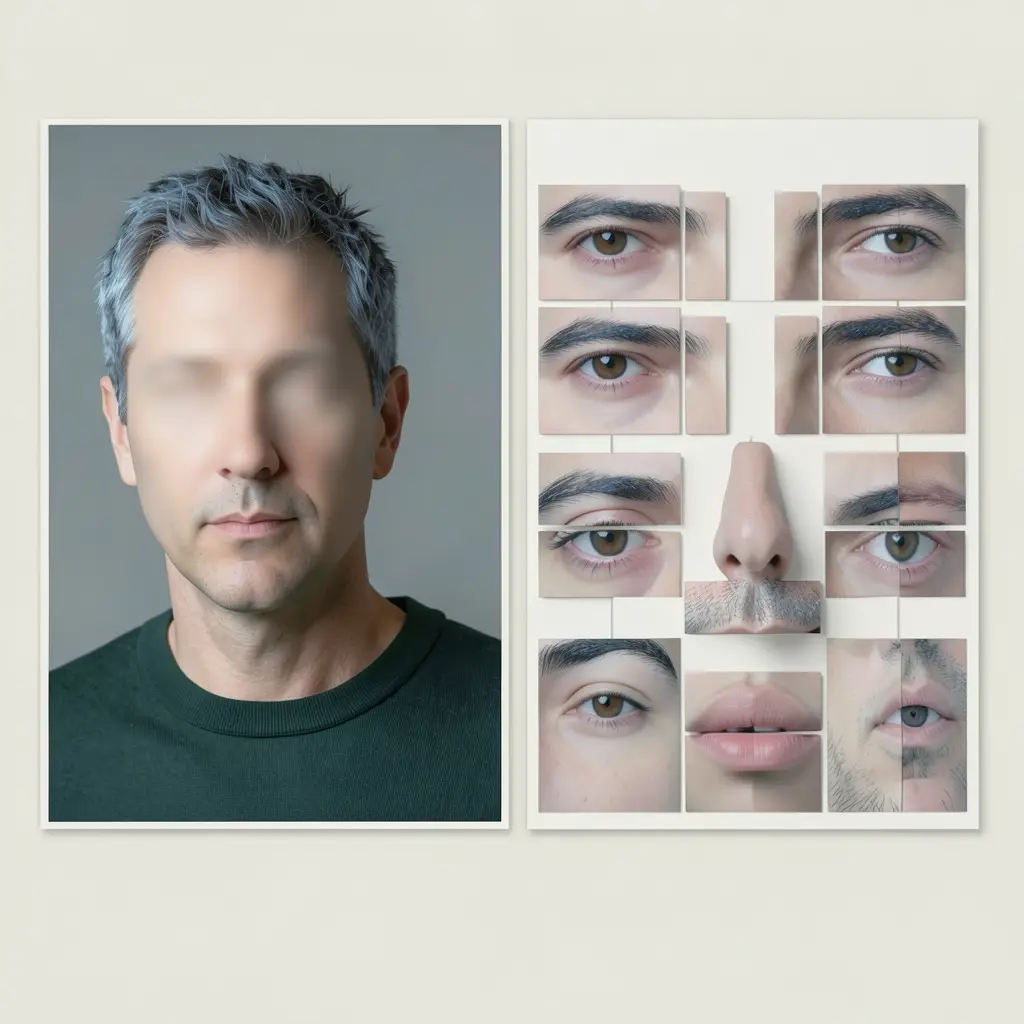
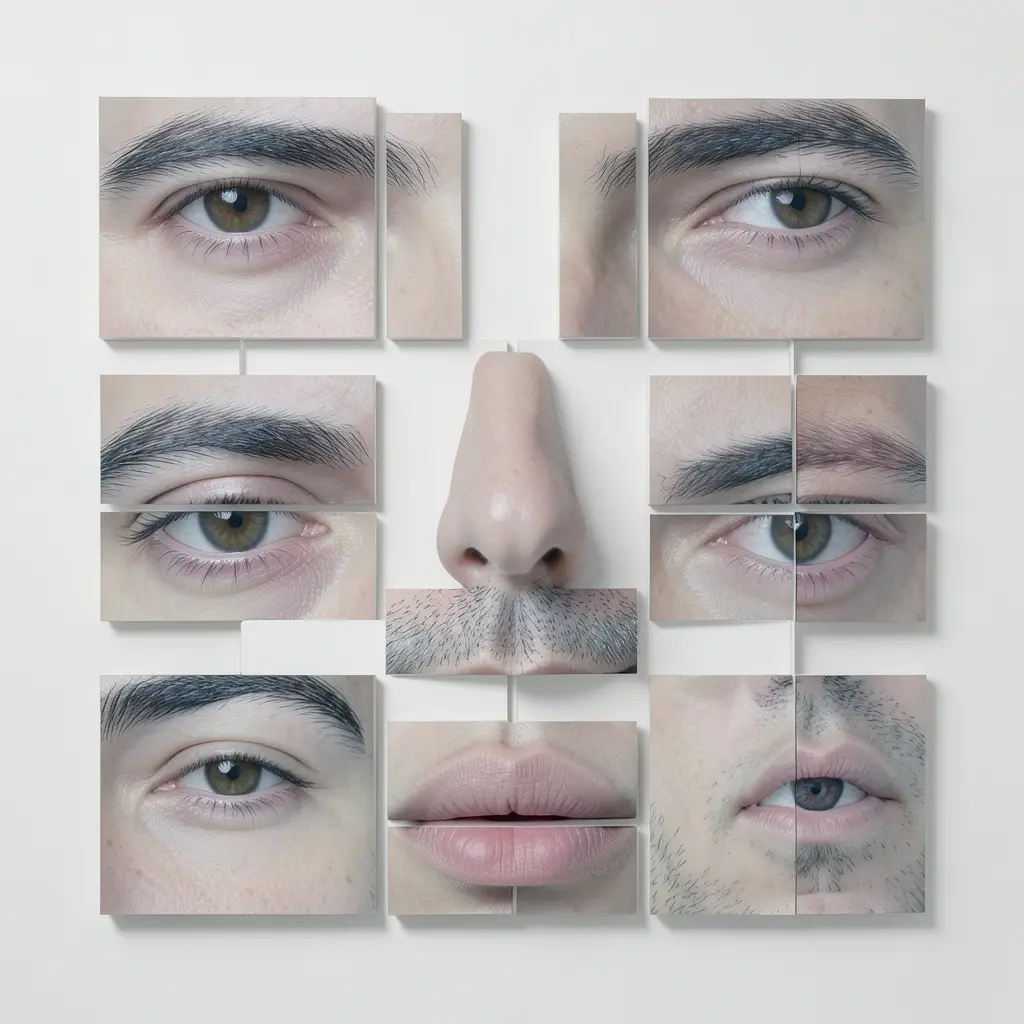
Face Warp is a portrait deconstructor: from a single face photo it makes two complementary variants. The first is "faceless" — the original portrait with the features gently erased while hair, pose, clothing and lighting stay untouched. The second is a "feature puzzle" — the eyes, brows, nose and lips extracted and arranged as separate pieces in the natural face layout on a white background. The first carries the body without identity, the second identity without the body. Important: the app has no face detection or landmark model — the deconstruction runs on vision analysis plus prompting, so it is an editorial approximation, not pixel-exact.
What you'll need
- FilmMovie Studio with an image provider and a vision-capable copy model configured (kie.ai or deAPI).
- One portrait photo with a clearly visible face — a real file, not a filename typed in chat.
- The right to edit that face — only work with portraits you own or have consent for.
Step by step
- 1
Start /face-warp and attach a portrait
In the chat panel pick the /face-warp skill. Use the paperclip icon to attach one portrait photo with a clearly visible face. Don't just type a filename into chat — the app needs the actual file, otherwise it asks you again.
Film Movie StudioRenderCubist Portrait Deconstruct…New projectFiles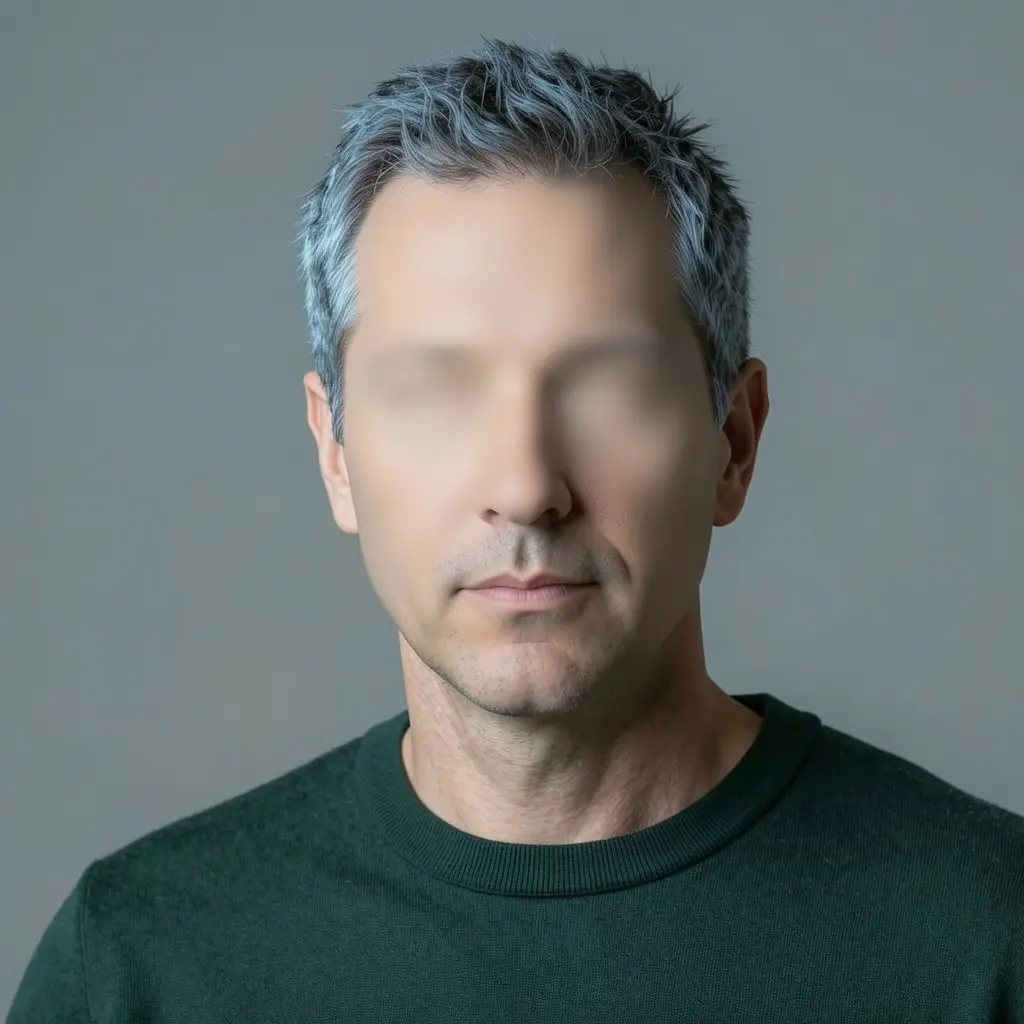 frame_1.png
 frame_2.png
 frame_3.png
 frame_4.png
Drag an image here, or click to upload
reference.pngTip: Avoid faces hidden by sunglasses plus a mask, or heavily blurred — the feature puzzle would be guesswork. - 2
Let it run the feature analysis (Character Profile)
The app runs a vision model over the photo and extracts a detailed profile: gender and age, hair, skin tone, face shape, distinctive features (eyes, brows, nose, lips, marks), clothing, pose, background and lighting. The result lands on the canvas as a "Character Profile" document card.
Film Movie StudioRenderCubist Portrait Deconstruct…New projectFilesframe_1.pngframe_2.pngframe_3.png frame_4.png
 frame_5.png60%promptframe_01.pngGenerating… 42%Remixframe_02.pngGenerating… 68%Remixframe_03.pngGenerating… 55%Remixframe_04.pngGenerating… 80%Remixoutput
 - 3
Generate variant A — the faceless portrait
A "character prefix" is composed from the profile and the image model creates the "Faceless" variant: the original portrait with the face area completely smooth and featureless, while the body, clothing, hair, background and lighting stay unchanged. The card is parented to the profile.
Film Movie StudioRenderCubist Portrait Deconstruct…New projectFilesframe_1.pngframe_2.pngframe_3.png frame_4.png
 frame_5.png
 frame_6.png60%promptframe_01.pngRemixframe_02.pngRemixframe_03.pngRemixframe_04.pngGenerating… 80%Remixoutput
 - 4
Check variant A's quality
The app automatically scores the result 1–10 against the original: face concealment, character consistency, natural skin appearance and image quality. On a fail it retries once with reinforcement for the weakest dimension. If the second attempt also fails, it keeps the better one and tells you which dimension stayed weak.
Film Movie StudioRenderCubist Portrait Deconstruct…New projectFilesframe_1.pngframe_2.pngframe_3.png60%promptframe_01.pngRemixframe_02.pngRemixframe_03.pngGenerating… 55%Remixoutput - 5
Generate variant B — the feature puzzle
The image model creates the "Feature Puzzle" card: only the eyes, brows, nose and lips extracted onto a white background in the natural face layout, each piece separate with thin seams — no face outline, no hair, no connected skin. This card is also parented to the profile.
Film Movie StudioRenderCubist Portrait Deconstruct…New projectFilesframe_1.pngframe_2.pngframe_3.png frame_4.png60%promptframe_01.pngGenerating… 42%Remixframe_02.pngGenerating… 68%Remixframe_03.pngGenerating… 55%Remixframe_04.pngGenerating… 80%Remixoutput
 - 6
Check variant B's quality
The puzzle is scored the same way: feature accuracy, skin-tone consistency, artistic quality and above all "no full face" (pieces must stay separated). On a fail one retry with targeted reinforcement; then the better attempt is kept.
Film Movie StudioRenderCubist Portrait Deconstruct…New projectFilesframe_1.pngframe_2.pngframe_3.pngframe_4.png frame_5.pngframe_01.pngRemixVariationsAdd to timelineFullscreenDelete
 - 7
Optionally composite both into one sheet
The app asks whether you want a single side-by-side sheet. On "yes" it makes a "Deconstruction Sheet" card — the faceless portrait on the left, the feature puzzle on the right on a white background. Done: feed either or both cards downstream as references via the context menu (Add to chat).
Film Movie StudioRenderCubist Portrait Deconstruct…New projectFilesframe_1.pngframe_2.pngframe_3.pngframe_4.pngframe_5.png frame_6.pngframe_01.pngRemixVariationsAdd to timelineFullscreenDelete
What you get
On the canvas you have a set of cards parented to the "Character Profile": the faceless portrait (body without identity), the feature puzzle (identity without the body) and optionally a combined sheet. Each variant is always scored against the original, so it stays character-consistent. You feed these references onward into scenes or videos where identity must travel without a full face — but remember it's an editorial approximation, not exact landmark extraction.
Pro tips
- Ethics and consent: only edit faces you have rights to — your own portraits or with the person's explicit consent. Don't deconstruct other people's faces without permission.
- Don't expect surgical precision — the app has no face detection, the result is an approximation from vision analysis plus prompting. A better input photo means better variants.
- Quality isn't skipped: both variants are always scored against the original; if a dimension stays weak, ask for another retry or supply a sharper photo.
Try it yourself
FilmMovie Studio is a desktop app that walks you from idea to finished export. Download it and start creating.
Get FilmMovie Studio